
Transfer your SolarEdge monitoring to Seed Solar
Moving your SolarEdge monitoring site from your old installer to Seed Solar lets our local Colorado team see your system's health, diagnose problems remotely, and service your inverter. It's done through SolarEdge's official transfer form — here's every step, with the exact info you'll need.
The screenshots below are from SolarEdge's official form, so what you see should match.
Register for a SolarEdge customer number
As of April 2025, SolarEdge requires homeowners to register for their online services before submitting requests. If you already have a SolarEdge customer number, skip this step. Otherwise, register on SolarEdge's website (or call us and we'll send you the registration link) — your customer number arrives by email.
You'll receive a SolarEdge customer number by email.
Open the Monitoring Site Transfer form
SolarEdge handles installer changes through their official “Request for Monitoring Site Transfer and New User Access” form. Open the form to get started.
SolarEdge's official "Request for Monitoring Site Transfer and New User Access" web form — open it directly to get started.
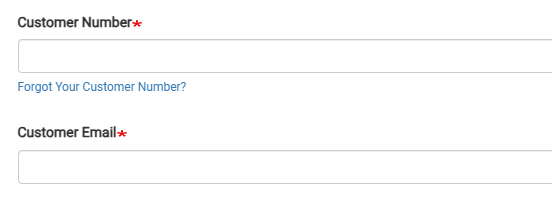
Enter your customer number and email
Fill in your SolarEdge customer number and the email address associated with your monitoring site. There's a "Forgot Your Customer Number?" link on the form if you need it.
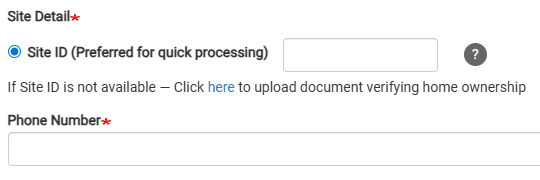
Enter your Site ID and phone number
Your monitoring Site ID is the fastest way for SolarEdge to process the request — it's shown in the mySolarEdge app and on your monitoring dashboard. If you don't have it, the form lets you upload a document verifying home ownership instead. Add your phone number too.
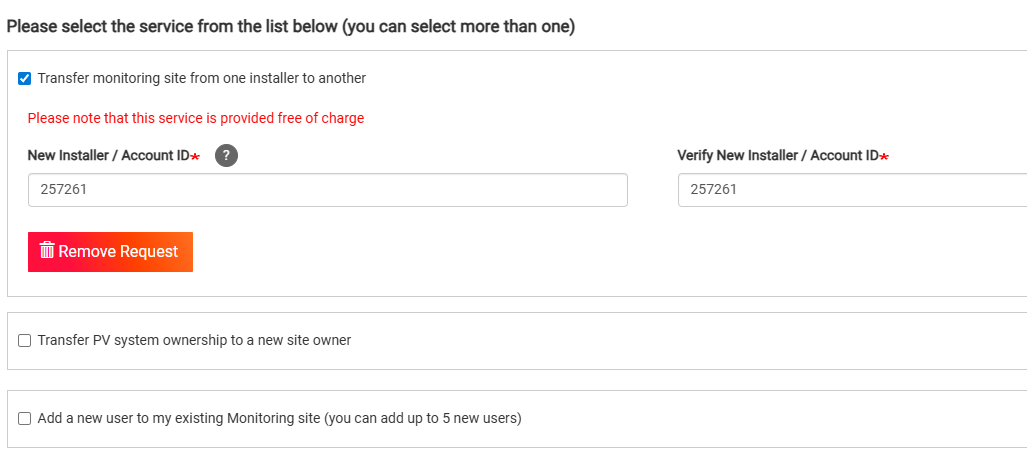
Select the transfer service and enter Seed Solar's ID
Check "Transfer monitoring site from one installer to another" — SolarEdge provides this service free of charge. In both the New Installer / Account ID boxes, enter Seed Solar's SolarEdge account ID: 257261.
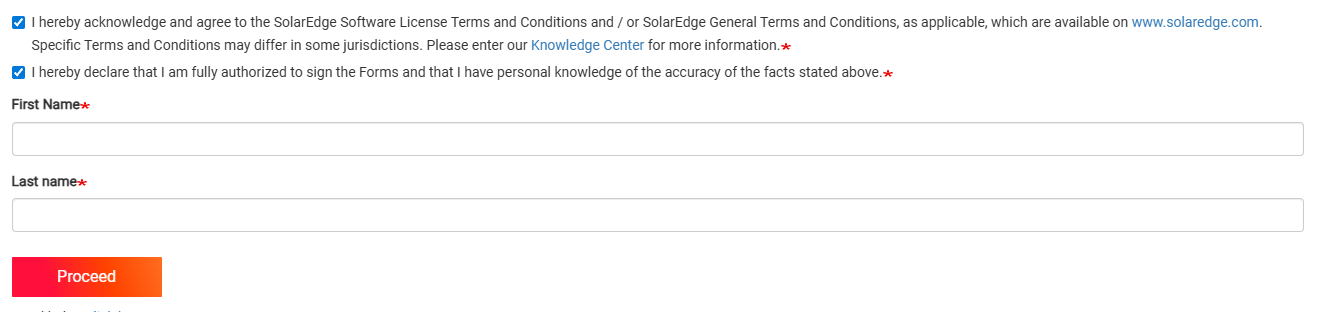
Agree to the terms, add your name, and submit
Tick the two acknowledgment boxes, enter your first and last name, and click Proceed. SolarEdge processes the request and Seed Solar becomes the installer on your monitoring site — we'll confirm once we can see your system.
Rather have it on paper — or have us handle it?
SolarEdge updates their forms from time to time, so wording may vary slightly from the screenshots above. If anything doesn't match — or you'd rather we walk you through it — call us at (720) 713-7695 and a real person on our Denver team will do it with you in a few minutes. You can also download our printable version of this guide.
Download the PDF guideNeed a hand with the transfer?
Call us and a real person on our Denver team will walk you through it — no waiting on hold with a national call center.